
Comments
This tab allows you to configure default properties for all comment and annotation types. Settings are applied automatically when creating new comments.
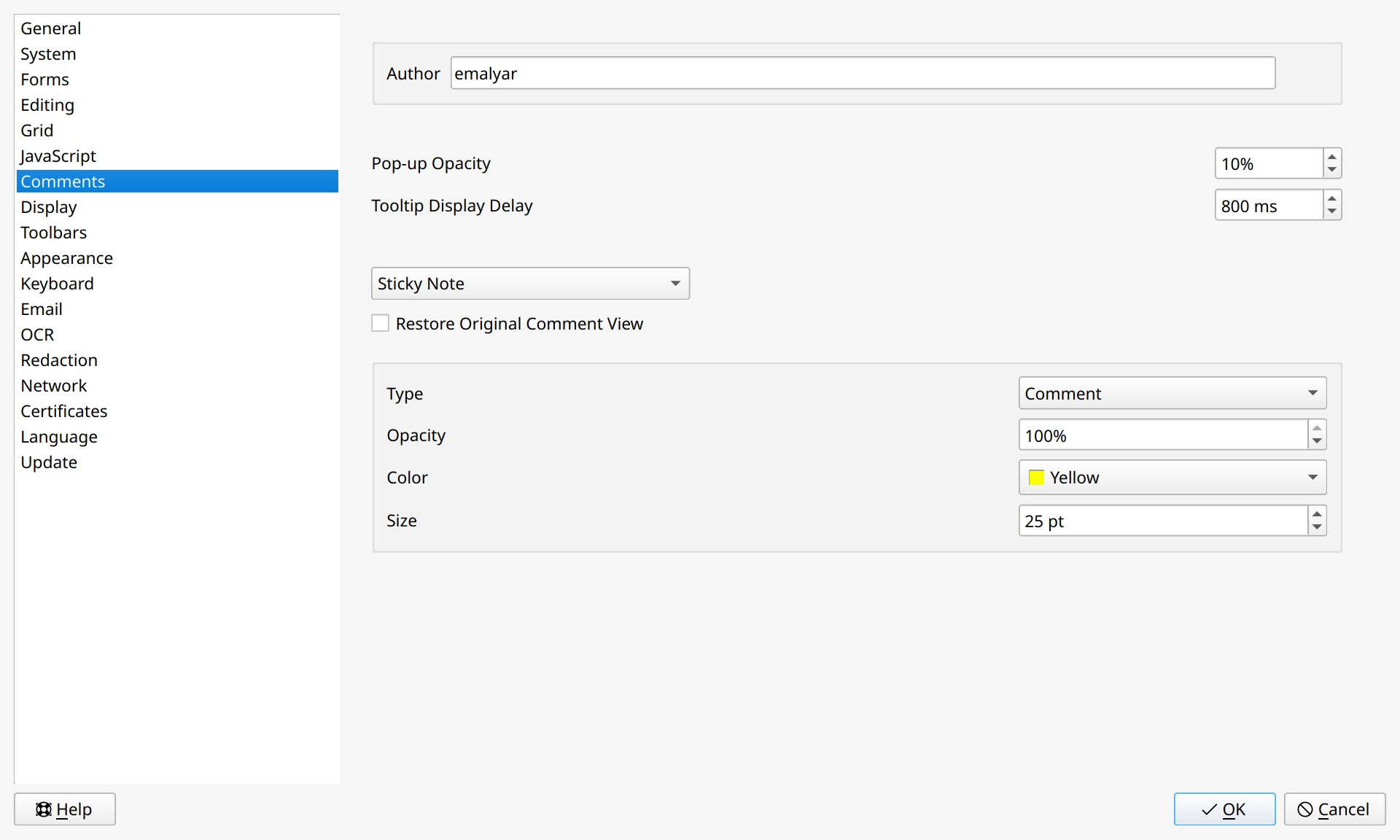
General settings
- Author. The name that will appear as the comment author. By default, the system username is used. You can specify a custom name, which will be saved with all newly created comments.
- Comment type (Sticky Note). Select the comment type for which you want to define default parameters.
- Sticky Note;
- Highlight Text;
- Strikeout Text;
- Underline Text;
- Measurements;
- Drawing;
- Typewriter;
- Callout.
 To configure settings for a specific comment type, select it from the Comment type drop-down list. All subsequent changes will apply only to that type. Configure one type, then select the next from the list and set its parameters. Click OK after completing all settings.
Settings for all comment types
- Pop-up Opacity. Sets the transparency level of the pop-up window that appears when hovering over a comment.
- Tooltip Display Delay. Sets the delay (in milliseconds) before comment text appears as a tooltip when hovering over an annotation.
- Restore Original Comment View. When enabled, the program automatically restores comments with damaged or incomplete structure (e.g., after export in third-party applications) when opening a document.
Sticky Note settings
- Type. Choose the appearance of the Sticky Note: comment, check mark, circle, cross, star, and others.
- Opacity. Sets the transparency level of the Sticky Note.
- Color. Sets the color of the Sticky Note icon and pop-up panel.
- Size. Sets the size of the Sticky Note on the page.
Settings for Highlight Text, Underline Text, Strikeout Text, Measurements, and Drawing Tools
- Opacity. Sets the transparency level of the annotation line.
- Color. Sets the color of the annotation line.
- Line width. Sets the thickness of lines.
Drawing Tools specific setting
- Create Pencil and Brush lines as single object. When enabled, all strokes created with the Pencil or Brush tools are combined into one object.
Typewriter settings
- Text. Configure font properties: family, size, style, color, and alignment.
- Border and Colors. Sets the color and thickness of the border, the fill color.
Callout settings
- Default Width. Sets the default width of the border.
- Callout arrow. Configures the appearance of the leader line arrowhead: select its size and symbol type (arrow, circle, diamond, etc.).
- Show move grip. When enabled, allows you to drag the entire text block (including borders) to another location on the page.